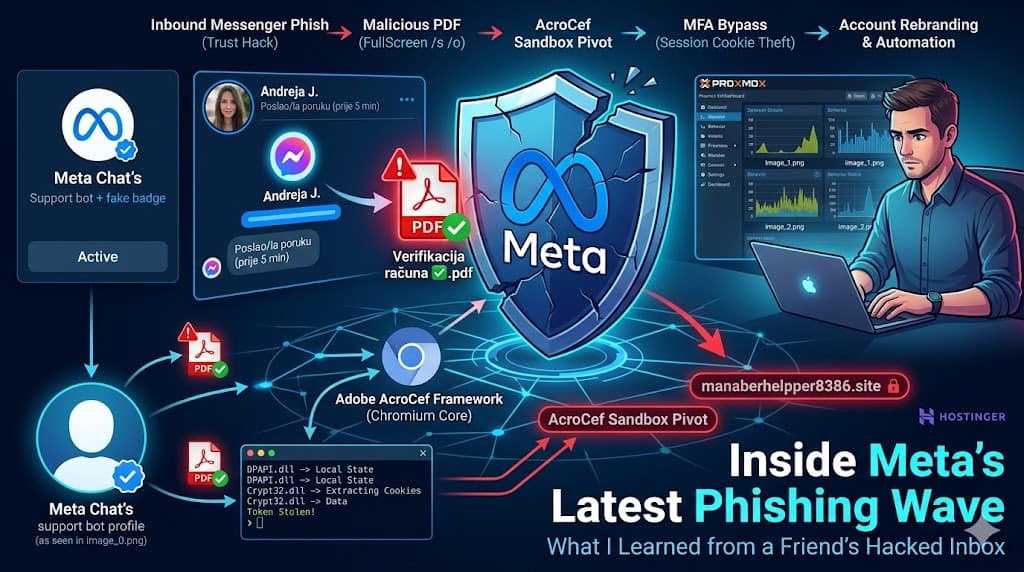
Over the past week, while working through the early morning shift, I encountered a highly aggressive and clever new phishing campaign right inside my personal Facebook inbox. Much like the Outlook phishing wave that systematically targeted various Croatian national institutions last year, this attack didn’t rely on glamorous or overly elaborate social engineering. Instead, it weaponized something far more dangerous: our innate trust in a familiar face.
The message came directly from a friend’s legitimate, uncompromised account profile. But by the time it reached my screen, the real owner had already been locked out, and automated backend scripts were using their digital identity to hunt for the next set of victims.
The Social Engineering Lure: A Localized Crisis
The campaign relies entirely on creating artificial panic. The compromised profile—suddenly renamed to “Meta Chat’s” and outfitted with a fake blue verification graphic—blasts out a direct message claiming your page/profile violates Meta’s community standards regarding content and cookies.
The text is written in clean, localized language (Croatian/Bosnian/Serbian), warning that you have a tiny 12-to-24-hour window to “verify” your account or face a permanent, irreversible ban.
The Social Engineering Lure: Fabricated Urgency
The hook relies on classic psychological pressure. The compromised account—suddenly renamed to “Meta Chat’s” and outfitted with a fake blue verification badge graphic—blasts out a direct message claiming your profile violates community guidelines.
The text is written in clean, localized language (Croatian/Bosnian/Serbian), warning that unless you “verify” your ownership via an attached PDF file within 12 to 24 hours, your account will be permanently banned.
⚠️ Obavijest od Mete
• Meta je danas primila prijavu o vašem računu iz sljedećih razloga...
• Molimo vas da pregledate Meta datoteku u nastavku...
The message includes an attachment innocently named Verifikacija računa ✅.pdf or 🔑File-provjera.pdf. Because it is a standard, structurally valid document generated via Canva, it sailed past initial email and platform spam filters with a clean 0/60 verdict on VirusTotal.
Into the Kill-Box: What the Sandbox and VirusTotal Revealed
To safely pick this apart without risking my production data, I spun up one of my standard Proxmox VMs—configured to look exactly like a standard, mid-tier consumer machine complete with persistent browser history and a messy downloads folder—solely to act as a secure handling zone. I downloaded the raw file from the forwarded inbox pipeline, extracted the hidden destination links, and fed the hash (158abc1dce5f1851279c523d2151c311b6b6fe096fe1b55df42ca01a7827b50e) straight into VirusTotal’s dynamic behavioral sandbox engine.
While static file scanners initially showed a clean 0/60 verdict, letting the file run inside the dynamic sandbox completely stripped away its disguise. The forensic log mapping revealed a sophisticated execution chain:
-
The Visual Override: The document uses command-line execution parameters (
/A pagemode=FullScreen /s /o) to force Adobe Acrobat Reader to open silently and maximize directly into full-screen mode. This deliberately hides the operating system UI and taskbar, tricking the user into thinking they are interacting with an official system framework. -
The Embedded Chromium Pivot: The large, blue “POTVRDA” (Confirmation) button inside the document doesn’t trigger a standard browser window link launch. Instead, it hooks directly into Adobe’s native Chromium Embedded Framework (
AcroCef.exe/RdrCEF.exe). It initializes an isolated web caching database (leveldb) in the background and opens up an outbound port 443 connection to a malicious landing node hosted on Hostinger:manaberhelpper8386.site. -
The Anti-Analysis Layer: The behavioral analysis logs caught the payload conducting high-precision runtime timing checks (
GetTickCount64,Sleep) and actively querying Windows Management Instrumentation (wmiprvse.exe) for system architecture attributes to see if it was being monitored.
Bypassing MFA: The Cookie Siphon
If a user takes the bait and falls for the credential harvesting forms pushed by the backend node, the attack leverages native Windows libraries (DPAPI.dll and crypt32.dll) to interact with the local browser files (Local State, Preferences).
The primary goal here isn’t just to copy passwords; it is a full-blown session token heist. By extracting and decrypting the active browser cookies, the attackers can entirely bypass multi-factor authentication (MFA). They simply load your live session state onto their own machines, cloning your authenticated login status instantly.
The second the session token hits the attacker’s server, the automated “opa, cupa” loop initiates:
-
Mass Purging: The script immediately wipes or blocks the user’s friend list and mutual connections, completely isolating the profile so close contacts cannot post public warnings or rapidly flag the compromise.
-
Chain Reaction: The account privacy settings are flipped, the profile is aggressively rebranded as a fresh “Meta Chat’s” bot node, and it immediately starts blasting the malicious PDF to everyone left in the contact network, triggering a relentless chain reaction.
In this instance, my friend acted quickly enough through Meta’s automated identity recovery loops to reclaim the profile, though they had to rebuild their entire mutual friend circle from zero.
How to Protect Yourself
The danger of these campaigns doesn’t lie in groundbreaking exploits, but in our shared tendency to lower our defenses when a message comes from someone we know. Much like the Outlook phishing runs hitting local organizations last year, these threats succeed by clearing the lowest bar of technical deception while exploiting high human urgency.
-
Treat Inbox Violations as Fake: Meta or Facebook will never message your personal inbox or send you a downloadable attachment to resolve an administrative community warning. Real security flags appear exclusively in your official, internal platform Support Inbox.
-
Inspect Full-Screen Switches: If opening a regular document automatically forces your desktop environment to vanish or locks your view into an unprompted full-screen layout, treat it immediately as a malicious evasion attempt.
-
Verify Through Secondary Channels: If you receive an unexpected document or urgent link from a friend, colleague, or mutual contact, pick up the phone or text them on a different platform to confirm they actually sent it.
As these localized phishing campaigns continue to sweep through our personal networks, spreading the word is our strongest defense. Share your experiences with friends and family, look out for the less tech-savvy people in your life, and remember to pause—and double-check—before you click. 🛡️
Disclosure: Text editing, proofreading assistance, and the featured cover image were co-created using Generative AI tools.